
Frequently asked questions from our support
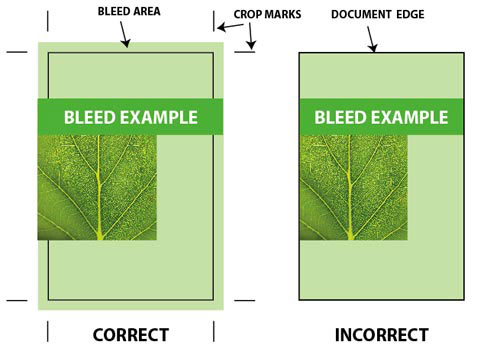
What is bleed?

Text-Safe Gutter
Borders
- Quark Express Include all fonts & supporting images. Supporting images should be in CMYK color format. Vectorize you files and then convert your files to *PDF. Make sure to save everything at the highest quality or at a resolution of 300 dpi and to embed your fonts.
- Adobe Illustrator Save file as an EPS Format, images should be embedded, and fonts should be converted to outlines. Vectorize you files and then convert your files to *PDF Make sure to save everything at the highest quality or at a resolution of 300 dpi and to embed your fonts.
- Adobe Photoshop Your Photoshop files should be flattened and saved as TIFF document. Your document should be in CMYK color format. Vectorize you files and then convert your files to *PDF Make sure to save everything at the highest quality or at a resolution of 300 dpi and to embed your fonts.
- *PDF Format We only accept PFD files that have been saved as a PostScript file from your native program first, then “distilled” using Acrobat Distiller using PRESS setting.
- Fonts Please provide all the fonts used in your document, both printer and screen fonts. Send the whole font family (bold, italic, bold italic, etc.). PostScript fonts are ideal for quality printing. Alternatively, you can convert your fonts to outlines in Illustrator.
- Scanning Scanned images should be of a professional standard and saved at an appropriate resolution of 300 dpi for continuous tone reproduction (photos and/or illustrations). Photos or scans should always be saved as CMYK in JPG format, vectorized and then transferred to a PDF file.
- Spot UV For spot UV products, send a separate file for the spot UV on the FRONT and another separate file for the spot UV on the BACK. These files should be clearly identified and indicate the position by using a solid color.
- Colors Please convert all your color images and graphics from RGB to CMYK prior to saving your PostScript and PDF files or sending your files. If you use spot colors or duotone images in your design please convert them to CMYK before saving.
- Color Proofing Colors are printed to www.canadawebprint.ca’s “pleasing color” standards. Matching your colors exactly is not guaranteed. If printing exactly your colors is critical colors a Color Key or Match Print is required. Inkjet or laser copies or other proofs are not acceptable as prepress color proofs.
Should I convert my files into CMYK?
Offset and Digital Paper and Cardstock
Paper and Material Options
Offset and Digital Paper and Cardstock
24 lb. Premium Classic Crest
Premium Solar White stock with a smooth finish. Printing on final product with your own inkjet or laser printer is guaranteed compatible. 97 paper brightness and is watermarked for authenticity.
70 lb. Uncoated Paper
Lightweight paper popularly used for its excellent writability. Colors may look less saturated. Printing on final product with your own inkjet or laser printer is guaranteed compatible.
80 lb. Glossy Paper
Lightweight paper used as an alternative of 100 lb. Glossy Paper to help save on postage. Coated with a reflective finish that shows off vibrant colors.
100 lb. Glossy Paper
Full bodied paper perfect for folding, coated with a reflective finish that shows off vibrant colors. Well suited for folded products.
100 lb. Matte Paper
Full bodied paper perfect for folding, coated with a dull, non-reflective finish for an understated and higher-end look and feel. Well suited for folded products.
100 lb. High Gloss UV Paper
Full bodied paper perfect for folding, coated with a reflective finish that shows off vibrant colors. Well suited for folded products.
10 pt. Glossy Cardstock
Heavy-weight stock more durable than 100 lb. paper and is scored when folded. Coated with a reflective finish that shows off vibrant colors.
10 pt. Matte Cardstock
Heavy-weight stock more durable than 100 lb. paper and is scored when folded. Coated with a dull, non-reflective finish for an understated and higher-end look and feel.
13 pt. Matte Recycled Cardstock
Premium 100% recycled paper with a non-reflective elegant finish, sharp color reproduction and unmatched environmental specifications. A sturdy cardstock with a brightness level of 92, this paper is the only matte coated stock made in North America with 100% recycled fiber and bleached without the use of chlorine compounds. It is Ancient Forest Friendly, Green-e Certified, Acid-Free and Archival.
14 pt. Glossy Cardstock
Sturdy stock with reflective coating to show off vibrant colors on both sides.
14 pt. High Gloss UV Cardstock
Sturdy stock with mirror-like coating for highest vibrant effect on both sides.
14 pt. High Gloss UV Front, Glossy Back Cardstock
Sturdy stock with mirror-like coating for highest vibrant effect on the front with reflective finish at the back.
14 pt. High Gloss UV Front, Uncoated Back Cardstock
Sturdy stock with mirror-like coating for highest vibrant effect on the front with excellent writability at the back. Uncoated back may look less saturated.
14 pt. Matte Cardstock
Sturdy stock with dull, non-reflective coating for an understated and higher-end look and feel.
14 pt. Uncoated Cardstock
Sturdy stock used for its excellent writability. Colors may look less saturated.
16 pt. Glossy Cardstock
Stiff stock with reflective coating to show off vibrant colors on both sides.
16 pt. Matte Cardstock
Stiff stock with dull, non-reflective coating for an understated and higher-end look and feel.
17 pt. Uncoated Cardstock
Stiff stock used for its excellent writability. Colors may look less saturated.
17 pt. Indoor Magnet
Thicker and more durable than standard business cards. The magnetized material sticks to most metal surfaces. Magnet is applied with clear mirror-like coating for highest vibrant effect.
Sticker and Label Options
White Paper Sticker – Gloss
Self-adhesive sticker paper with crack and peel backing coated with a reflective coating to show off vibrant colors. Not waterproof and available in Cut-to-Size format.
White Paper Sticker – Matte
Self-adhesive sticker paper with crack and peel backing coated with a dull, non-reflective coating for an understated and higher-end look and feel. Not waterproof and available in Cut-to-Size format.
White Paper Sticker – Uncoated
Self-adhesive sticker paper with a excellent writability. Colors may look less saturated or faded. Not waterproof and available in Sheet format.
White Paper Sticker – High Gloss
Self-adhesive sticker paper with crack and peel backing coated with a mirror-like finish for highest vibrant effect. Not waterproof and available in Cut-to-Size and Sheet format.
White Vinyl Sticker – High Gloss
Self-adhesive vinyl with crack and peel backing coated with a mirror-like finish for highest vibrant effect. Waterproof and available in Cut-to-Size format.
White Premium Sticker Paper
Most popular paper label on roll format. Ideal for most indoor applications. Available in either gloss or matte lamination which adds oil & water-resistance to the label face.
White BOPP
Polypropylene label popularly used to for it’s solid background. Available in roll format for easy application and with either gloss or matte lamination, it is a great option for indoor products that require exposure to water, oil, moisture or refrigeration.
Clear BOPP
Polypropylene label popularly used for the capability to see through the material. Available in roll format for easy application and with either gloss or matte lamination, it is a great option for indoor products that require exposure to water, oil, moisture or refrigeration.
Silver Metallic BOPP
Polypropylene label popularly used to make colors look metallic. Available in roll format for easy application and with either gloss or matte lamination, it is a great option for indoor products that require exposure to water, oil, moisture or refrigeration.
White Vinyl
Vinyl label popularly used for its durability. Available in roll format for easy application and with either gloss or matte lamination, it is a great option for products requiring both indoor and outdoor use.
White Vellum Texture – Estate #8
Warm white adhesive paper with a tactile paper feel. Optional matte UV coating adds scratch and moisture-resistance to the label face. Popular option for wine and beverage bottle labels. Writable when no additional coating is applied.
White Laid Texture – Estate #4
White adhesive paper with a subtle linear texture. Optional matte UV coating adds scratch and moisture-resistance to the label face. Popular option for wine and beverage bottle labels. Writable when no additional coating is applied.
Cream Laid Texture – Estate #9
Cream colored adhesive paper with a subtle linear texture. Optional matte UV coating adds scratch and moisture-resistance to the label face. Popular option for wine and beverage bottle labels. Writable when no additional coating is applied.
Large Format Materials
Canvas
Real poly-cotton blend canvas with a Satin finish meant for stretching or framing. It is UV and water resistant for long lasting prints.
Corrugated Plastic
Durable, lightweight corrugated plastic for indoor and outdoor usage. Bright white material allows vivid, visible graphics.
High Gloss Photo Paper
Thick premium quality HP photo paper with high shine finish. Ideal for photo enlargements.
Semi Gloss Photo Paper
Thick premium quality HP photo paper with a medium shine finish. Ideal for signs, advertisements and charts.
Opaque Static Cling
Easy-to-apply thick vinyl static cling. Great for window graphics and POP displays. Either side can be applied to a smooth surface. Not see-thru. Unprinted surfaces will be an opaque white. Removable, repositionable and reusable. Reusable if non-printed side is applied to glass
Clear Static Cling
Easy-to-apply thick vinyl static cling. Great for window graphics and POP displays. Either side can be applied to a smooth surface. Optional white ink adds opacity to areas where it is applied. Areas without white ink (HPI white) will be clear. Removable, repositionable and reusable. Reusable if non-printed side is applied to glass.
Perforated Adhesive Vinyl
Vinyl 30% Perforated with each hole at 0.062″ diameter to see through, and is 6.5 mil. thick with adhesive backing. Adhesive is at the backside of the material for the decal to be installed at the exterior side of the glass. Can withstand temperatures between 0°F to 140°F and lasts up to 1 year and up to for clean removal, up to 3 months. Do not use solvents to clean.
Adhesive Fabric
High quality adhesive fabric made by Photo-tex®. Suitable for indoor and outdoor applications. Popular uses include wall, floor and general sticker graphics. Ideal for cut-out.
White PVC Board
1/8″ thick, durable rigid board. Waterproof, long lasting and recyclable. Popularly used for indoor and outdoor signage and presentations.
Standard 13 oz. Vinyl
Vinyl with a matte finish for great visibility even in bright light. Popular, economical option which lasts 3-5 years outdoors, in temperatures as low as -4°F. Superior tear-resistance with tensile strength: 154.2 x 137 lbs/in.
Premium 15 oz. Vinyl
Vinyl with a matte finish for great visibility even in bright light. Strongest, smoothest and most versatile option which lasts about 5 years outdoors, in temperatures as low as -22°F. Fungus resistance, ultimate tear-resistance with tensile strength: 285 x 239 lbs/in
Blockout 13 oz. Poly Film
Waterproof material with a smooth surface. Has a bright white color with gray backside providing ultimate opacity even in bright lighting.
Mesh 9 oz. Vinyl
Meshed vinyl allows 25% air-flow through. Tear resistant: 218.94 x 184.22 lbs/in tensile strength and 81.13 x 61.51 lbs/in tear strength and can withstand outdoor temperatures as low as -4°F and as high as 176°F. Ideal for building wraps, fence mesh graphics, and boulevard banners in high wind areas.
30 pt. Outdoor Magnet
Thick, heavy-duty and durable magnetized material suitable for use on vehicles and other outdoor applications. Attaches to most flat metal surfaces and is repositionable, removable and reusable.
How should I set up my file for proper rotation?
Printing.coop requires Print Ready files with proper rotation. Files submitted are printed HEAD to HEAD as-is based off your files.
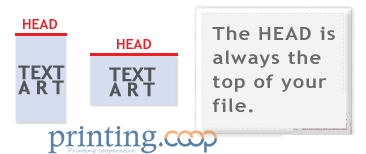
Make sure to set up your files so that when we print them HEAD to HEAD the final product will read the way you would like. Also, front and back files need to be set up either both sides vertically or both sides horizontally.
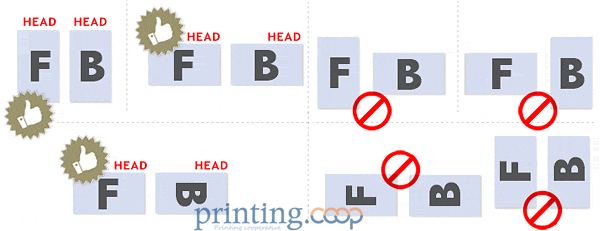
If you would like your back file to be upside down, please send your artwork as shown below.

If you have a fold-over or greeting card, please send your artwork as shown.
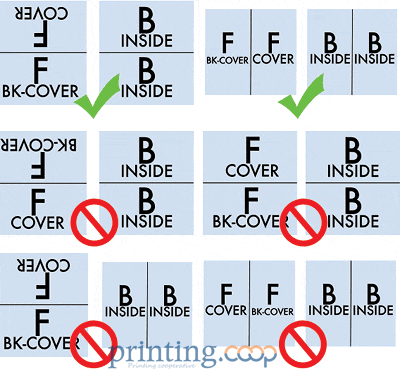
For files not properly set up, printing.coop will use best judgment and will not be responsible for improper rotation.
How can I avoid transparency issues?
Any transparency issue can be resolved before saving your file.
What a transparency problem looks like on screen…

After a transparency problem is printed…

To prevent this, never use shadows, glows, or any other transparency (image or otherwise) on top of a spot color. Always convert your spot color to CMYK and flatten before sending.
SHADOWS | GLOWS | TRANSPARENCY

All of these effects will cause transparency problems.
Should I send a proof or sample file?
When sending artwork, do not send extra files, like proofs or samples, because they might get printed. Only send the files you need printed.
DO NOT SEND THESE KINDS OF FILES
We are not responsible for these kinds of files being printed. Unless requested by one of our employees, DO NOT send files that you do not want printed.
What is overprint, and how can it ruin my file?
Primarily used to intentionally overlap inks for a number of reasons, overprint can cause unexpected results. We suggest that you turn all overprint objects off before submitting your files.
ON SCREEN VIEW————AFTER PRINTING

In this case the logo was set to overprint. The colors from logo are mixing with the colors from the background. Unexpected results may occur if you have accidentally set certain objects to overprint. Always check logos and other artwork before submitting.
What type of files can I send to printing.coop?
We recommend saving as a PDF file. You may also send the file in the following types: JPG, JPEG, TIF, TIFF, EPS, and PNG.
We prefer that you send PDF with embedded or outlined fonts. PDF files are easier to handle and will likely speed up your turn-around. Remember to flatten your files before uploading.
For Roll Labels, we recommend designing:
- vector files (e.g. EPS or PDF)
- 300 DPI or higher
- use black (100% K)
- for fine lines and text smaller than 9pt, use black (100% K) only
What color mode should my files be?
If you send us an RGB file, there is a chance that a color shift may occur and you may not be satisfied with your job.
THESE COLORS ARE IN RGB
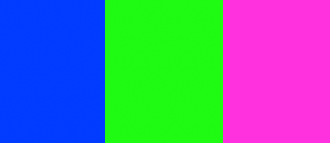
THESE ARE THE SAME COLORS BUT IN CMYK

You should always start and finish your designs in CMYK color mode.
What resolution should my file be?
Low resolution files may be printed as is or will be placed on hold until we receive new files, slowing your turn-around.
THESE ARE 72 DPI LOW RES IMAGES
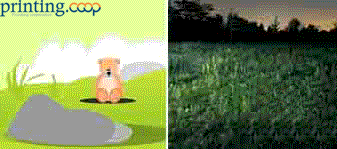
THESE ARE THE SAME IMAGES BUT AT 300 DPI
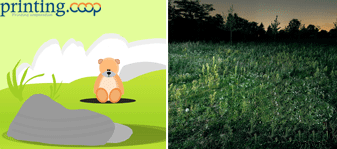
We only accept 300 dpi files and no less.
How should I set up my bleed?
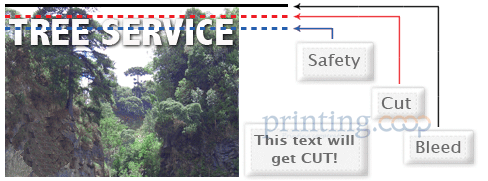
Bleed must extend past the cut-line and will be trimmed from the product during the final cutting phase. When the image is required to extend all the way to the edge, bleed is needed to preserve the finished look and the quality of the final product.
Please keep all text at least 0.125″ inside the cut-line.
- The bleed for Standard Products is 0.125″.
- The bleed for Booklets and Presentation Folders is 0.25″.
We recommend using our templates at all times.
Does printing.coop accept borders on jobs?
Yes, but if the border is too close to the cutline, it may be cut off-center slightly.
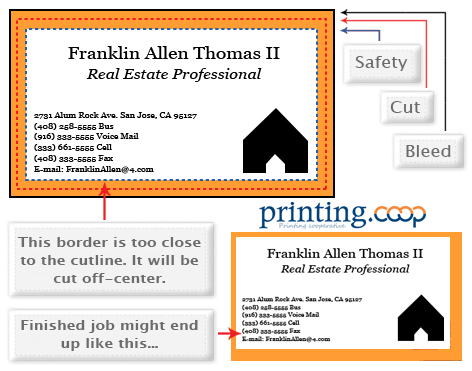
We cut through many sheets at a time, so watch your borders to avoid an unwanted mistake.
Can I submit a front and back in the same file?
No. We are now specifically set up to process one side at a time, and this requires that each side of a job must be on a separate file.
2 FILES – 1FR, 1BK
1 FILE – FR&BK
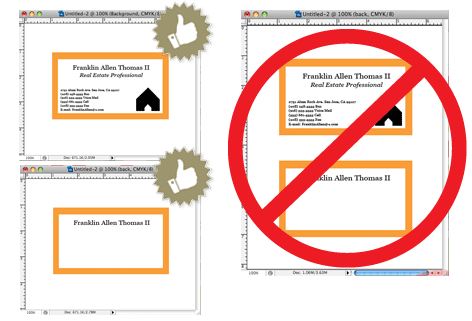
Not separating files will cause delays and you might have to send the files again. Remember to separate the pages of your .pdf files as well.
How should I set up a Spot UV job?
When using a blue in your design, always make sure to leave at least a 30% difference in your Cyan and Magenta values.
100% C 100% M 0% Y 0% K
ON SCREEN

AFTER PRINTING

Blue is close to purple in the CMYK spectrum. Remember, use a low amount of magenta whenever using high amounts of cyan to avoid purple.
EXAMPLE: C-100 M-70 Y-0 K-0
How can I make sure my blues do not come out purple?
No. We are now specifically set up to process one side at a time, and this requires that each side of a job must be on a separate file.
2 FILES – 1FR, 1BK
1 FILE – FR&BK

Not separating files will cause delays and you might have to send the files again. Remember to separate the pages of your .pdf files as well.
How do I export a .pdf correctly?
When exporting from any program such as Indesign or Illustrator, use these settings to make sure your .PDF files export correctly.
EXPORT SETTINGS FOR .PDF FILES
Adobe PDF Preset is set to: Press Quality

Compatibility is set to: Acrobat 4 (PDF 1.3)

Compress Text and Line Art is set to: Off
